Blog / Marketing
How to Track QR Code Scans (Free Stats + Google Analytics)
6 min read · 26 November 2026
To track QR code scans, create a dynamic QR code: every scan passes through its short link, so the scan is counted before the person reaches your page. For deeper insight into what people do after scanning, add UTM parameters to your destination URL so the visits show up as a separate campaign in Google Analytics.
Static codes can’t be tracked, because the phone goes straight to your content without anything in between. If measuring results matters, decide on dynamic before you print.
Why static codes can’t be tracked
A static QR code stores your content directly in the pattern. When someone scans a static code for your website, their phone opens your site immediately. Nothing records that a scan happened.
You can still get some insight from a static code by adding UTM parameters to the URL (more on that below), but you won’t get a scan count from the code itself. And for static types that don’t open a web page, such as Wi-Fi, text or phone codes, there’s no way to track them at all.
How dynamic codes count scans
A dynamic code holds a short link instead of your final address. When the code is scanned:
- The phone opens the short link.
- The scan is recorded, along with basic information about it.
- The person is forwarded to your destination.
This all happens in a moment. The person scanning just sees your page. Dynamic codes are available for URLs and PDFs.
On the free plan, people see a short sponsored page before being forwarded. On Pro, the sponsored page is removed and scans go straight to your link. You need a free account to see your statistics, but not to create codes.
What scan statistics you get
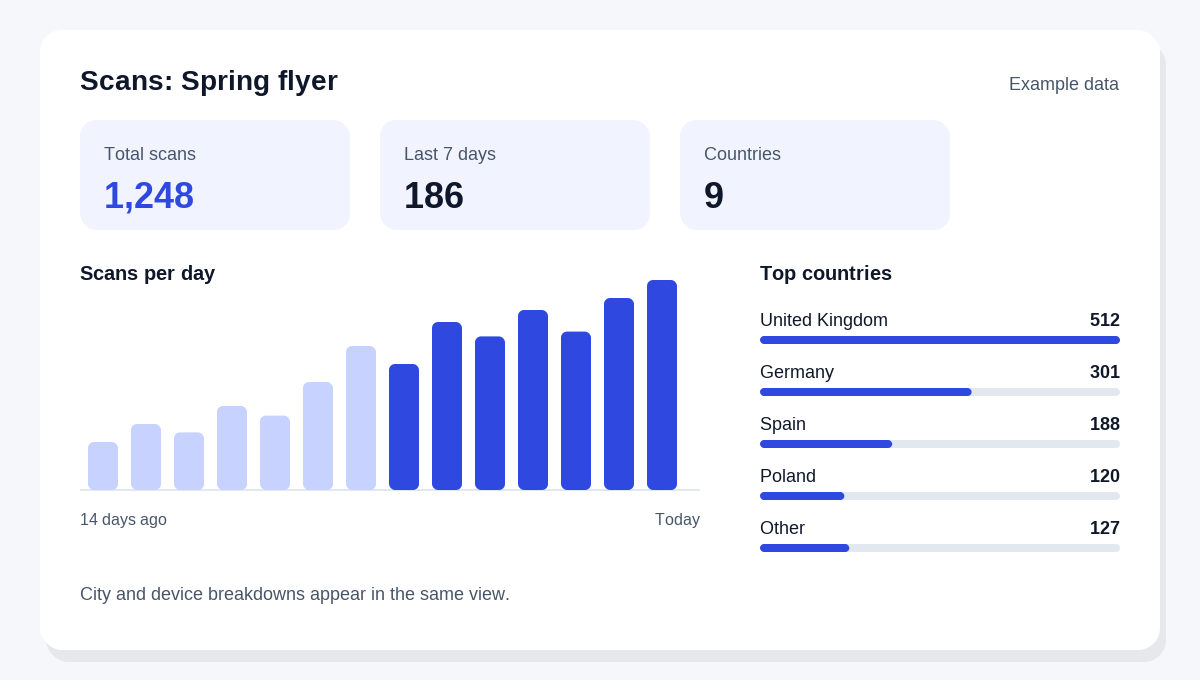
On the free plan, every dynamic code includes scan statistics broken down by:
- Country: where in the world your codes are being scanned.
- City: useful for local campaigns or comparing branches and venues.
- Device (Pro): which kinds of phones your audience uses, plus browsers and languages.
Pro adds full statistics for a more detailed view of each code’s performance.
What scan data can tell you
- Whether a placement works at all. A poster with almost no scans after a week is a signal to move it, enlarge the code or rewrite the call to action.
- Which location performs best. If the same campaign runs in two cities, the city breakdown shows where people respond.
- When interest drops. Scans falling to zero often mean a flyer has been thrown away or a sign has been covered.
- What phones to design for. The device breakdown on Pro tells you what to test your landing page on.
Use one code per placement
The simplest tracking trick is also the most useful: create a separate code for each place you put it. If the same code appears on a flyer, a poster and your packaging, you’ll know how many scans you got in total, but not which one drove them.
Keep a simple record of which code went where, for example “Spring flyer – city centre” or “Menu – table tents”, so your numbers are easy to read later. Since codes are free and unlimited, there’s no cost to making as many as you need.
This works especially well for flyers and posters and event materials, where you often test several designs or locations at once.
Add UTM parameters for Google Analytics
Scan statistics tell you how many people scanned. Google Analytics, or a similar tool, tells you what they did next: which pages they visited, whether they signed up or bought something.
The problem is that visits from QR codes often show up in analytics as “direct” traffic, mixed in with people who typed your address. UTM parameters fix that. They’re small tags added to the end of your URL that tell your analytics tool where the visit came from.
How to build a UTM link
Add these three tags to your destination URL:
utm_source: where the code is, such asflyerorposter.utm_medium: the channel, usuallyqr.utm_campaign: the campaign name, such asspring_sale.
For example:
https://example.com/offer?utm_source=flyer&utm_medium=qr&utm_campaign=spring_sale
Then:
- Open the URL QR code generator.
- Paste the full link with the UTM tags.
- Choose a dynamic code so the long URL doesn’t make the pattern dense.
- Download, test and print.
In Google Analytics, these visits now appear under the source, medium and campaign you set, separate from everything else.
UTM tips
- Use lowercase and underscores consistently.
Flyerandflyerare counted as different sources. - Keep one naming scheme for your whole team so reports stay tidy.
- Test the link in a browser first to make sure the page still loads with the tags.
Interpreting the numbers
Scan counts are useful, but they need context.
Scans and visits won’t match exactly
Your scan count and your analytics visits will usually differ. Some people close the page before it loads, some browsers block analytics scripts, and some people scan the same code more than once. Treat both numbers as signals pointing in the same direction rather than figures that must agree.
Compare like with like
A code on a shop counter will always get more scans than one on the back of a receipt. Compare placements of a similar type, or compare the same placement before and after a change, such as a bigger code or a clearer call to action.
Look at what happens after the scan
A code with many scans and no sign-ups may be fine; the problem could be the landing page. Check that it loads quickly on mobile and that the offer matches what the printed material promised.
Watch trends, not single days
Daily numbers jump around. Look at weekly totals and how they change over the life of a campaign.
Ways to get more scans
- Make the code big enough for the scanning distance. See the print size guide.
- Tell people what they’ll get: “Scan for 10% off” beats a code with no explanation.
- Put it at eye level and where people pause, such as a queue or a table.
- Keep good contrast so it scans first time.
FAQ
Can I track a static QR code?
Not directly. A static code doesn’t pass through any link, so scans aren’t counted. You can add UTM tags to a static URL code to see visits in Google Analytics, but not scans of the code itself.
Is QR code scan tracking free?
Yes. Dynamic codes include scan statistics by country and city on the free plan. Pro adds devices, browsers and languages and removes the sponsored page.
Do I need an account to see scan statistics?
Yes. You can create codes without an account, but you need a free account to manage your codes and see their stats.
Will tracking stop if I cancel Pro?
Your codes keep working after you cancel Pro. You lose Pro features such as full statistics and editing the destination.
Start tracking your QR codes
If you want to know how your printed materials perform, create a dynamic code from the start. Open the URL QR code generator, add your UTM-tagged link, and you’ll see scans come in as soon as people start using it.