Blog / Guides
QR Code Safety: How to Scan Safely and Protect Your Codes
5 min read · 26 November 2026
QR codes are safe to scan when you check where they lead before you open them, and never type passwords or payment details into a page you reached from a code you don’t trust. The main risk is not the code itself but a fake one, often a sticker placed over a real code, that sends you to a lookalike page.
This guide covers both sides: what to watch for when you scan, and what businesses can do to keep their printed codes trustworthy.
Why QR codes can be misused
A QR code is just a way of writing text, usually a web address, that a camera can read. It can’t run anything on its own. The risk is that people can’t read a QR code with their eyes, so they can’t tell where it leads until they scan it.
That makes a code a convenient disguise for a bad link. The common trick, sometimes called “quishing” (QR phishing), is simple:
- Someone prints a code that opens a page designed to look like a real one, such as a parking payment page or a login screen.
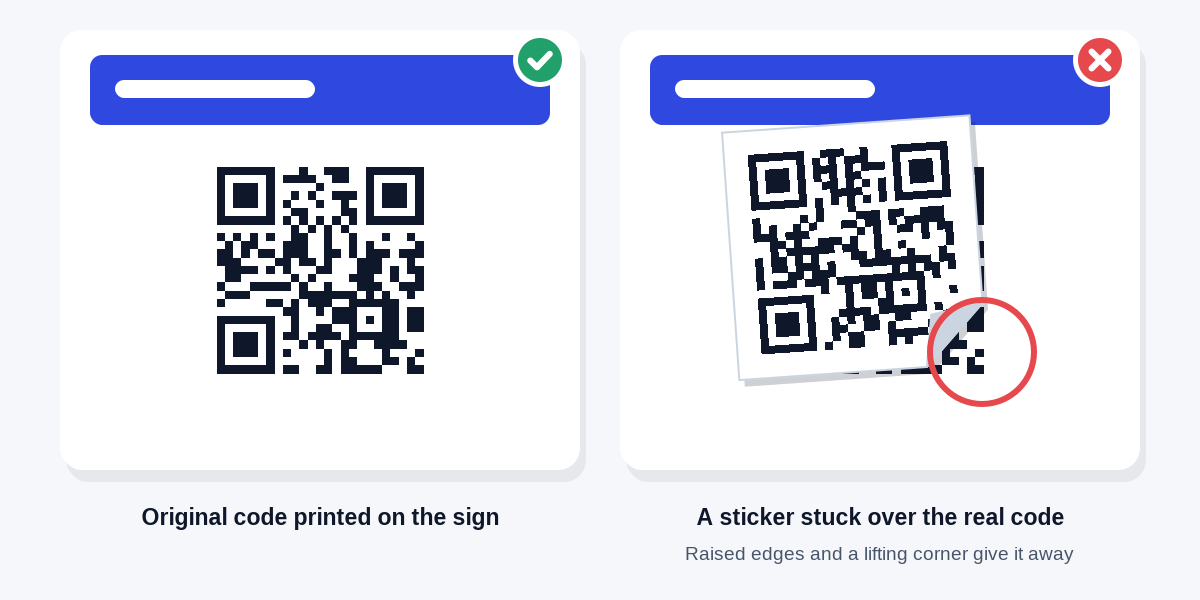
- They stick it over a genuine code, on a parking meter, a poster or a restaurant table, or send it by email or letter.
- A person scans it, trusts what looks familiar, and enters their details.
Knowing how it works is most of the protection.
Safety tips for people scanning codes
1. Look at the code before you scan
Check whether it is a sticker on top of something printed. A code that is peeling, slightly crooked, on a different material or covering another code deserves suspicion, especially on parking meters, charging points and public signs.
2. Read the link preview
When you point your camera at a code, most phones show the web address before opening it. Read it:
- Does the domain match the organisation you expect?
- Is the spelling right? Lookalike addresses swap or add letters.
- Is it a long string of random characters where you’d expect a familiar name?
If the preview doesn’t look right, don’t tap it.
3. Never enter passwords or payment details from an unknown code
This is the most important rule. If a code takes you to a login or payment page, stop and ask whether you’d trust this page if you’d found it any other way.
Safer alternatives:
- Open the official app, or type the website address yourself.
- Pay at the counter, terminal or official machine instead.
- Ask staff whether the code is theirs.
4. Be wary of urgency
Codes in unexpected emails, letters or parcels that say “Your account will be closed” or “Pay now to avoid a fine” use pressure to make you skip checks. Real organisations don’t mind you taking a minute to verify.
5. Watch what you’re asked to install
Be cautious of a code that asks you to download an app or file from outside your phone’s official app store. If you need an app, search for it in the store yourself.
6. Know what different codes do
Not every code opens a web page. A Wi-Fi code joins a network, a contact code saves a contact, a phone or email code prepares a call or message. Your phone normally asks before doing any of these, so read the prompt before you confirm.
Safety tips for businesses using QR codes
If you put codes in front of customers, their safety is partly in your hands.
Check your codes regularly
Scan your own codes from time to time, especially those in public or unattended spots: tables, windows, outdoor signs, posters, parking areas. Confirm they open your page, and look for anything stuck on top.
Make tampering hard and obvious
- Print the code into the material rather than adding it as a separate sticker, where you can. A code printed on the sign or menu itself is harder to cover convincingly.
- Place codes behind glass or lamination in public spaces.
- Put codes where staff can see them, not in hidden corners.
- Use a distinctive frame, colour or logo so a plain substitute stands out. See adding a logo to a QR code.
Use a domain people recognise
Link to your own website when you can, and print the address in text near the code, for example “Scan to see the menu at yourrestaurant.com”. People can then compare the printed address with the link preview. Our guide to a QR code for your website covers the basics.
Tell people what to expect
A clear label like “Scan to view our menu. We never ask for card details here” helps customers spot anything unusual. If your code does lead to a payment page, say so and name the provider they will see.
Keep control of where codes point
A dynamic code lets you see scan statistics, and with Pro, change the destination after printing. If you ever need to replace a page, you can update the code instead of leaving old links in the world. Pro also offers password protection and an expiry date for codes that should only be used by certain people or for a set time. See static vs dynamic QR codes and the pricing page.
Tell customers if something happens
If you find a fake code on your premises, remove it, check the others nearby and let customers know through your usual channels.
Is it safe to create QR codes online?
Creating a code is low risk: you enter content and download an image. On QRGeneratorBox you don’t need an account to create codes, so you don’t have to share personal details to make one. Static codes contain the content directly, and codes never expire. If you create a dynamic code, keep your account login secure, since that account controls where the code points.
FAQ
Can scanning a QR code hack my phone?
Scanning a code only reads text, usually a web address. The risk comes from what you do next, such as opening a fake page and entering details or installing an unknown app. Check the preview first.
How can I tell if a QR code is fake?
Look for stickers placed over other codes or signs of tampering, and read the link preview. If the address doesn’t match the organisation you expect, don’t open it.
Is it safe to pay through a QR code?
Only when you’re confident the code is genuine, for example printed on a bill handed to you by staff, and the payment page clearly belongs to the business or a provider you recognise. When in doubt, pay another way.
What should a business do if someone covers its code?
Remove the fake, scan your other codes, and consider laminated or printed-in codes in visible places. Let customers know if they might have been affected.
Create trustworthy QR codes
Clear labels, your own domain and regular checks go a long way. Create a branded code with the URL QR code generator, and print your web address next to it so people know exactly where it leads.